New in version 0.1.34

Web-ready images. Without a pipeline.

Version 0.1.34 · Apple Silicon · macOS 14 or newer

Preparing images for a website usually means uploading them to a service or wiring up a build step. Web Export does the same work in the app, on your Mac: several widths and formats in one pass, filenames that read as URLs, sRGB colour, rights metadata, a link preview, and markup you can paste straight into a page as HTML or JSX.

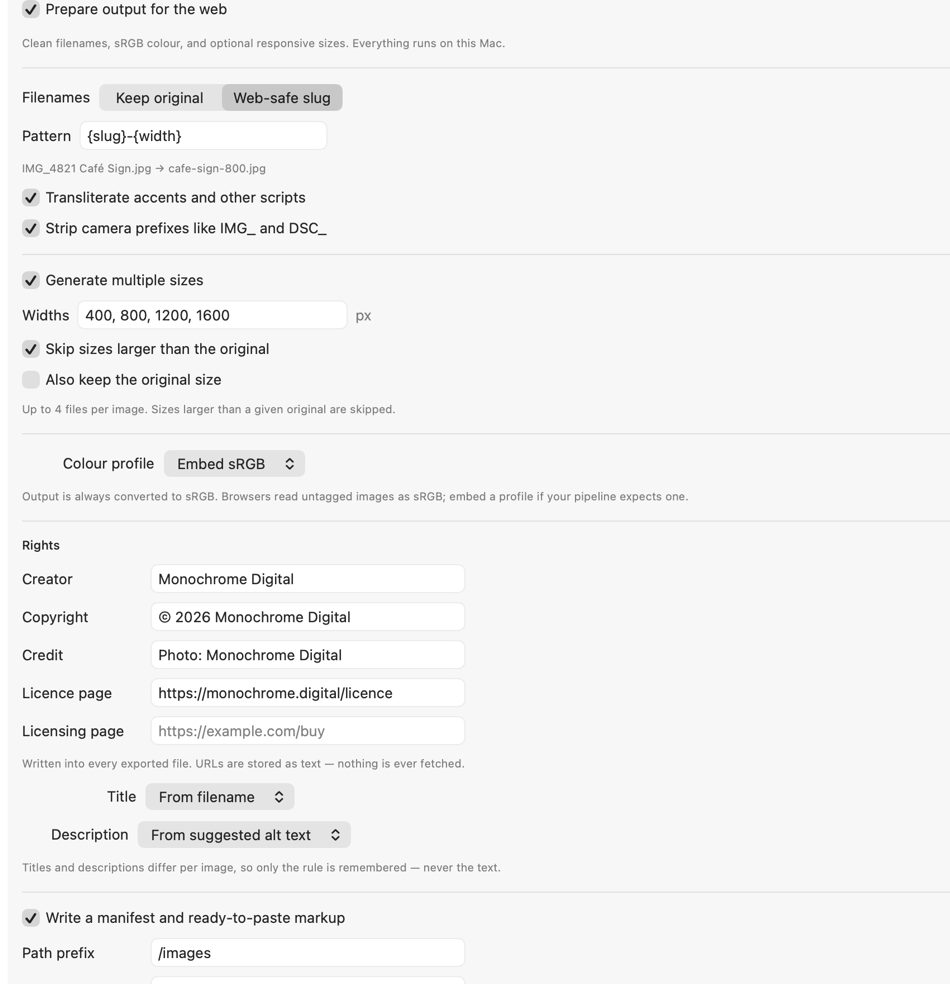
The Web Export section of Image Resizer, showing filename patterns, responsive widths, colour profile, rights fields and alt text options

One pass, several widths

Every size a responsive layout needs.

A ladder of widths

Give a list of widths — 400, 800, 1200, 1600 — and each source produces one file per width in a single pass. The resize mode you already chose decides what each width means, so Fill & Crop keeps a consistent shape across the whole set.

Never larger than the original

Widths above a given image’s own size are skipped rather than upscaled, so a small photo does not become four copies of itself under four different names. An image narrower than every width still produces one file at its own size.

Named after the size they actually are

Filename patterns can include the output width and height, so cafe-sign-400.jpg really is 400 pixels wide — measured after cropping and rotation, not copied from the number you typed.

Tell it how wide the image sits

A browser picks which file to download before the page has a layout, so it can only go by what the markup says. Choose full width, half, a third, a quarter or a fixed column, and the sizes attribute is written for you. It matters more than it sounds: telling a browser an image fills the screen when it occupies a third of it makes the browser fetch the largest file every time, and a ladder of widths then saves nothing at all.

Smaller, without a fallback problem

Modern formats, and something for everyone else.

AVIF and WebP alongside a fallback

Write each image in more than one format in a single pass. The format you already chose stays the one every browser can read; AVIF and WebP are offered ahead of it for the browsers that understand them, which is most of them.

Offered as a choice, not a guess

The markup is a <picture> element listing each format with its media type, most efficient first. A browser takes the first one it understands and never downloads the others. No detection script, no server rules, no separate build.

What your Mac can actually write

AVIF requires macOS 26 to write, so the option is disabled on earlier versions and says why, rather than failing partway through a batch. The generated markup follows suit: a set produced without AVIF offers WebP and the fallback, and is correct as it stands.

Readable URLs

Filenames that survive being a link.

Slugs, not camera output

Lowercase, hyphenated, ASCII. Camera prefixes and their frame numbers are treated as one unit, so IMG_4821 Café Sign.jpg becomes cafe-sign.jpg — not 4821-cafe-sign.jpg. A file named only IMG_4821 keeps its number, because nothing else remains.

Other scripts transliterate

Accents lose their diacritics, Arabic and Han romanise. A name made entirely of emoji or punctuation falls back rather than producing a file with no name at all.

Patterns

Compose names from the slug, the original stem, the output width and height, and the format. The example updates as you type, so you can see the result before running anything.

Collisions resolved before writing

Slugging makes clashes ordinary — three differently punctuated files can reduce to one name. Every filename in a batch is decided before the first file is written, so duplicates are numbered predictably instead of overwriting each other.

Correct on every screen

sRGB, and labelled as such.

Converted, then tagged

Output is always converted to sRGB. You can leave it untagged, which every browser reads as sRGB and which keeps files smaller, or embed an explicit profile when a pipeline expects one.

No inherited profiles

A wide-gamut source’s colour profile is never carried onto converted pixels. Version 0.1.21 fixes a case where a Display P3 WebP could come out as sRGB pixels still wearing a P3 tag, which browsers rendered over-saturated.

Credit that travels

Ownership written into the file.

IPTC and XMP

Creator, copyright and credit are written as IPTC and mirrored into XMP. A licence page URL is written as xmpRights:WebStatement and a licensing URL as plus:Licensor — the fields image search uses to show rights information.

Set once for the batch

These describe you rather than any one photograph, so they are stored with your settings and applied to everything in a run.

Titles and descriptions stay per image

A caption belongs to one photograph, so the app remembers the rule — keep what the file already has, derive from the filename, use a suggested description, or leave it empty — and never the text itself. Stamping one caption onto forty photographs would be worse than leaving them blank.

When someone shares the page

A link preview that keeps the subject.

The crop the platforms want

Messaging apps and social platforms render a link as a card, and the shape they want is roughly two to one — a shape nothing else in a batch produces. Web Export writes one extra image per source at that shape, as a JPEG, because scrapers are the most conservative readers of anything a site serves.

Cropped around what matters

A two-to-one crop of a portrait throws away most of the frame, so the app finds the subject first and crops around it instead of the middle. Recognition runs on your Mac, and an image with no clear subject is cropped from the centre as before.

And the tags to go with it

The markup carries og:image with the real dimensions of the file that was written, plus the card type — the four lines a preview needs. The preview image is kept out of the responsive set, because it is a different picture rather than a smaller one, and a browser offered it for a layout would show the wrong crop.

Ready to paste

A manifest and the markup to go with it.

manifest.json

Every source, its slug, and each file produced from it with real width, height, format and byte count — read back from the written files rather than from what was requested.

A snippet you can paste

A <picture> offering each format, a complete srcset, the sizes value your layout implies, and intrinsic width and height so the page does not jump as images arrive. A path prefix lets the paths describe where the files will live rather than where they were written.

HTML or JSX

Choose the dialect and the file is written to match. This is not cosmetic: React ignores srcset and fetchpriority, so HTML pasted into a component renders, looks correct, and silently loses the responsive behaviour. The JSX version spells the attributes the way React reads them.

Loading priority

The first image of a batch is marked to load immediately and the rest lazily. Deferring the image a page paints largest is the most common way generated markup makes a page measure worse rather than better, so drop your hero image in first.

Structured data

The credit and licensing fields are also written into the page as schema.org markup. Search engines read both this and the metadata inside the file, and page markup survives a CMS that re-encodes images on upload — which strips everything the file itself was carrying.

Optional inline placeholders

A tiny base64 image can be embedded in the manifest and markup, so a blurred version appears while the real file loads. No extra request, because it travels inside the HTML.

On this Mac

Alt text suggestions, offline.

Recognition, then wording

Image recognition runs locally and produces labels. Where a Mac has Apple’s on-device language model, those labels are phrased into something readable; where it does not, the labels are used directly. Neither stage sends anything anywhere.

It declines rather than guesses

Suggestions only ever repeat what was actually recognised, and images the recogniser is unsure about are left undescribed. Alt text that confidently describes something absent is worse for a screen-reader user than no alt text at all.

Suggestions, not decisions

These are a starting point and need your review before publishing. A suggestion describes what was recognised in a picture, which is not always what matters about it — the reason an image is on a page is something only you know.

Why it matters

The whole point is that nothing leaves.

No service, no account, no upload

Responsive sizes, metadata and alt text are normally jobs for an image CDN or a build pipeline — which means your images, and your clients’ images, sitting on someone else’s servers. Every part of Web Export runs in the app. The licence and licensing URLs you enter are stored and written as text; they are never fetched. Read security & privacy details →

Go deeper

See the rest of the app—or download it.